Rotate an agent’s credentials and revoke a device
Agents authenticate to LRO with credentials stored on the machine, bound to its hardware. Sometimes you need to change that: you are moving the agent to new hardware, you lost the credentials file, you suspect a machine is compromised, or you are decommissioning it. Two panel actions cover all of these — Re-register to rotate, Delete agent to revoke.
-
Open the agent’s controls
Go to Agents, open the agent, and its lifecycle actions are at the bottom of the detail view: Re-register and Delete agent (alongside subscription controls).
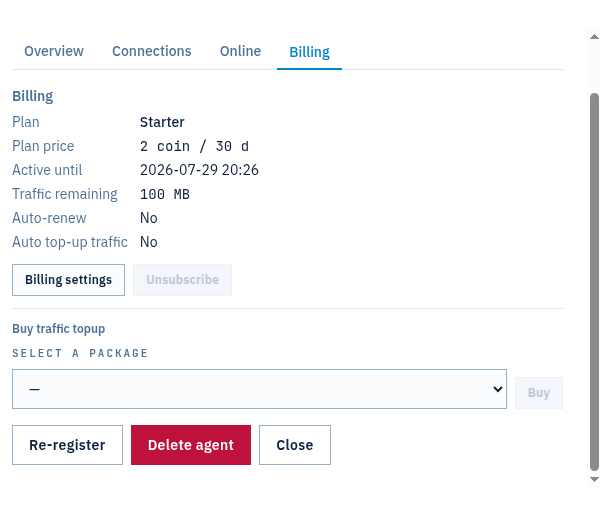
Fig 1. Each agent’s lifecycle controls — Re-register to rotate credentials, Delete agent to revoke. -
Re-register to rotate credentials
Re-register issues a fresh one-time token for the same agent and invalidates the old credentials immediately. The agent’s identity, subscription, balance and remaining traffic are preserved — only the secret on the machine changes.
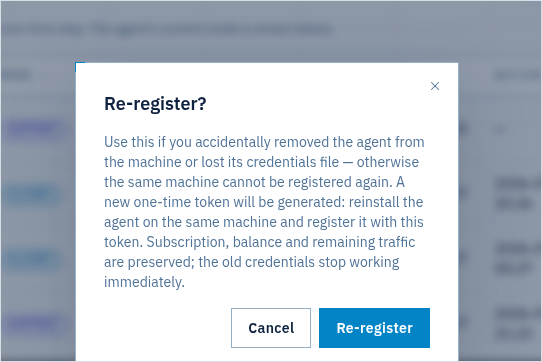
Fig 2. Re-register — a new token is generated; old credentials stop working at once, subscription and traffic carry over. Then, on the machine, register the agent again with the new token — the same step as a first install:
$ lro -t - # paste the new token (stdin keeps it out of the process list) $ lro # run the agent — it reconnects with fresh credentialsUse this to move an agent to new hardware (re-register, then install with the new token on the new machine), to recover a lost credentials file, or to rotate a secret you think may be exposed — the old one is dead the moment you confirm.
-
Revoke a device by deleting the agent
When a machine is decommissioned, lost or should no longer have access, Delete agent revokes it outright. Its credentials stop working, it disappears from the panel, and its endpoints and tunnels are removed. Unlike re-registration, this is permanent — the agent is gone, not re-keyed.
Rule of thumb: Re-register when the machine stays but the secret must change; Delete agent when the machine goes. For a stolen laptop you would normally delete, then register a replacement.
Notes
- Old credentials die immediately — re-registration does not leave a grace window for the previous secret; the instant you confirm, only the new token works.
- Identity is preserved on re-register — subscription, balance, traffic, endpoints and tunnels stay attached to the agent. Deleting, by contrast, removes them.
- E2E tunnel keys are separate — per-tunnel encryption keys are negotiated fresh for every tunnel and zeroized on close; pre-shared keys for tunnels live in each agent’s own keystore (managed from the agent’s installer menu or GUI), independent of the login credentials rotated here.
- Audit trail — agent lifecycle changes land in the org Audit log with the acting user.
Rotate a secret or retire a device in seconds — from the panel.
Create an account →