Traffic, coins and top-ups
LRO billing has two parts, and once you see them it is simple. A per-agent subscription keeps an agent active and includes a traffic bucket; traffic beyond that bucket is metered. Everything is denominated in coin, which you top up with real currency. This guide shows where each lives in the panel.
-
Top up your coin balance
My balance shows your current balance and recent activity: coin spent, coin bought and traffic used over the selected window, with a per-agent breakdown. Top up adds coin by card.
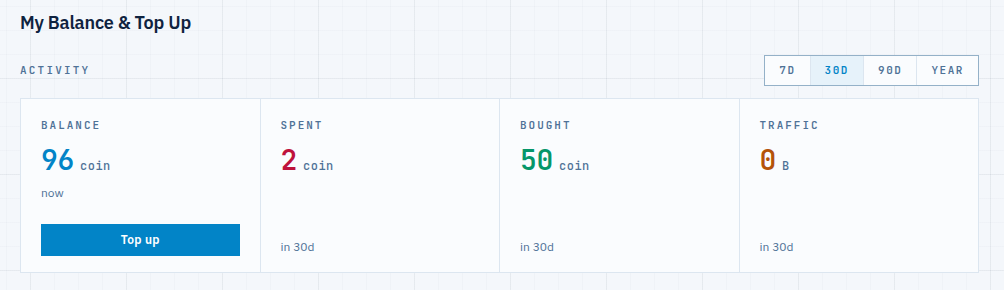
Fig 1. The balance page — what you have, what you spent and bought, and where the traffic went. -
Subscribe an agent and watch its traffic
Open an agent and its Billing tab. Here you see the plan and its price, the active-until date, and the traffic remaining in the current bucket. An agent without a plan cannot open tunnels — subscribing is what activates it (only the side that opens tunnels, the client, needs a plan).
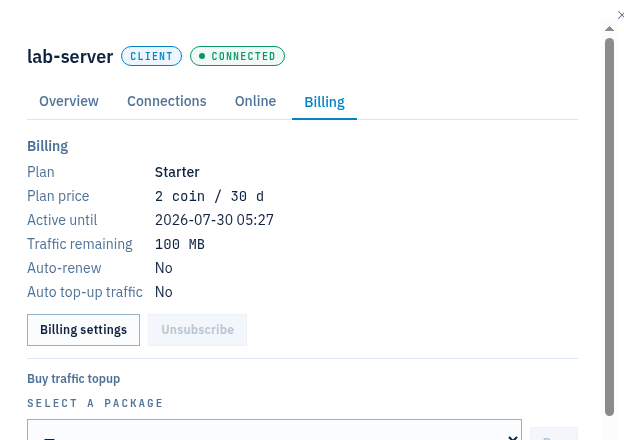
Fig 2. Per-agent billing — plan, traffic remaining, auto-renew and auto top-up, with a traffic-package picker. -
Buy traffic or enable auto top-up
When an agent is busy, you have three levers, all on that Billing tab:
- Buy a traffic package — add a chunk of traffic to the agent immediately from Buy traffic topup → select a package.
- Auto-renew — let the subscription renew itself at the end of the period so the agent never lapses.
- Auto top-up traffic — automatically buy more traffic when the bucket runs low, up to a limit you set, so long-running tunnels don’t stall.
Set these per agent under Billing settings. They draw from your coin balance, so keep it funded (or let auto top-up of the balance, where available, handle it).
Notes
- Subscription + traffic — the plan keeps the agent active and includes a bucket; traffic beyond the bucket is metered per GB. Idle agents use no traffic, but the subscription still applies.
- Client pays, support is free — only the agent that opens tunnels (the client) needs a subscription. The support side — your own machine — does not.
- See where it went — the stream log breaks traffic down per tunnel and per agent; the balance page summarises it per agent.
- Coin is the currency — one balance funds every agent, subscription and traffic package. Top it up by card; current plans and rates are on the pricing section.
One balance, clear usage, no surprises.
Create an account →